


Apple CarPlay has revolutionized the way we interact with in-car infotainment systems. If you’re an iPhone user and drive a compatible vehicle, it transforms your dashboard into a safer, smarter extension of your smartphone. But what exactly is it, and how does it work inside your car?
Let’s dive deep into the technology behind it, how to use it, and why it’s becoming a standard feature in modern vehicles.
What Is Apple CarPlay?
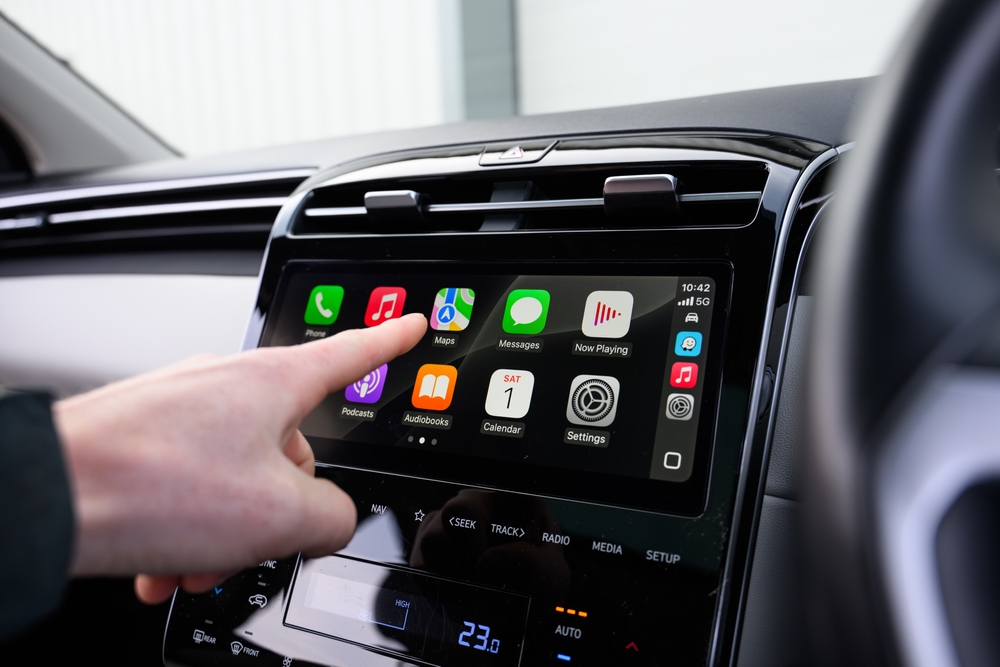
It is a software interface developed by Apple Inc. that integrates iPhone functionalities into your car’s infotainment system. It allows you to access core iPhone features like navigation, calls, messages, and music without ever picking up your device.
Once connected, your car’s built-in display mirrors a simplified iOS interface. You can control it via the vehicle’s touchscreen, steering wheel buttons, voice commands (Siri), or a rotary controller, depending on your car’s design.
It is not a standalone operating system; instead, it relies on your iPhone to function. The system supports iPhone 5 and newer models running iOS 7.1 or later.
How Does Apple CarPlay Work?
It connects your iPhone to the car using either a USB cable or wirelessly (if supported by your vehicle). Once connected, the vehicle’s display seamlessly switches to the CarPlay interface.
Here’s how it functions in real time:
-
Navigation: Apple Maps, Google Maps, and Waze are available for turn-by-turn navigation. With real-time traffic updates and voice-guided directions, drivers can reach their destination safely.
-
Communication: You can send and receive messages or make calls through Siri, allowing hands-free interaction. Dictation ensures your focus remains on the road.
-
Entertainment: Stream music, audiobooks, or podcasts using Apple Music, Spotify, Audible, and more.
-
Siri Voice Control: Siri plays a central role in it. Simply press the voice command button on your steering wheel and say things like, “Call John” or “Play my driving playlist.”
Although the interface is familiar, it’s designed to reduce distractions. Icons are larger, fonts are cleaner, and only essential apps are shown.
Wired vs. Wireless Apple CarPlay
Initially, it was available only via USB connection. However, recent models support Wireless CarPlay, which connects automatically once paired via Bluetooth and Wi-Fi. While wireless usage offers convenience, it does consume more battery unless your car has wireless charging.
Keep in mind that wireless CarPlay is mostly available in newer vehicles or via aftermarket receivers from brands like Pioneer, Kenwood, or Alpine.
What apps work with it?
Apple CarPlay supports a range of native and third-party apps. These apps are optimized for in-car use and must meet Apple’s safety standards. Some commonly used apps include:
-
Apple Maps, Google Maps, Waze for navigation
-
Phone, Messages, WhatsApp for communication
-
Spotify, Apple Music, Audible, YouTube Music for entertainment
-
Calendar, Podcasts, Overcast for productivity
Although CarPlay doesn’t support video or web browsing, its app ecosystem focuses on safety, simplicity, and driver convenience.
Which Cars Support It?
Most car manufacturers have adopted it, either as standard or optional. Some of the notable brands include:
Even budget-friendly models now offer CarPlay compatibility, making it accessible across all price segments.
Is it safe?
Yes, It is designed with safety in mind. Instead of tapping your phone screen, you control apps using voice or dashboard inputs. As a result, it minimizes distractions and helps you keep your hands on the wheel.
Additionally, notifications are simplified, calls are handled quickly, and maps are voice-guided, all promoting safe driving habits.
However, it’s essential to use CarPlay responsibly. Avoid excessive screen time and rely more on voice commands to ensure safety.
Benefits of Using
-
User-Friendly Interface: Familiar iOS design makes it easy to use.
-
Reduced Distraction: Voice-first interaction promotes safer driving.
-
Real-Time Navigation: Stay informed with traffic updates and route suggestions.
-
Multimedia Access: Control your music and podcasts with minimal effort.
-
Cross-Device Sync: CarPlay syncs seamlessly with your iPhone apps and data.
Final Thoughts
Understanding what Apple CarPlay is and how it works in your car can significantly enhance your driving experience. It turns your vehicle into a smart companion, bridging the gap between technology and mobility. With improved safety, intuitive controls, and powerful iOS integration, it continues to set the standard for in-car connectivity.
Whether you drive daily in the city or head out for long road trips, having it in your vehicle can make your journeys more convenient and enjoyable.
To explore more informative articles, visit ArabWheels and stay updated on everything related to cars.