
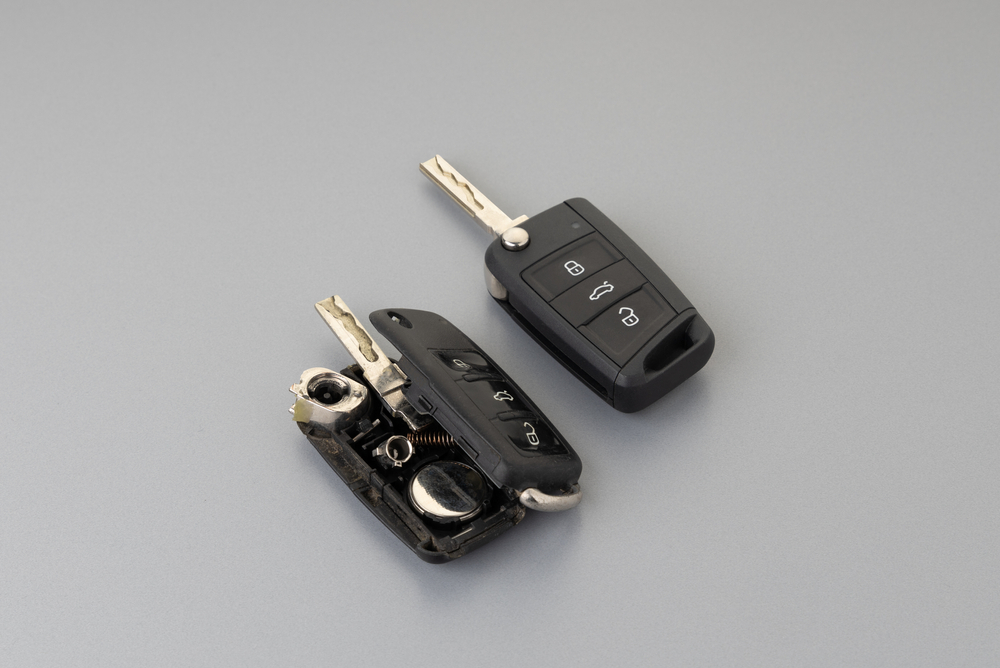
How to Change the Battery in a Remote Control Key
A Simple DIY Guide to Fixing Your Key Fob Quickly and Easily

Ever had that moment where you’re standing next to your car, pressing the unlock button again and again… and nothing happens? No sound, no lights, no welcome beep. It’s frustrating, but chances are, it’s not your car that’s failing you. It’s your key fob.
Thankfully, there’s no need to panic or rush to the dealership. In most cases, the fix is simple and surprisingly quick. You just need to know how to change the battery in the remote control key, and once you do, you’ll never let a dead key catch you off guard again.
In this guide, we’ll walk you through everything you need to know, from identifying the signs of a low battery to replacing it yourself like a pro. Let’s get started.
Signs Your Remote Control Key Battery Needs Replacing
-
Remote buttons are unresponsive
-
Reduced range of key fob operation
-
LED indicator on the key no longer lights up
-
Inconsistent or failed engine start attempts
-
The dashboard shows a key fob battery warning
These are clear indicators that your key fob battery may need replacement. Fortunately, you can do it yourself quickly with just a few tools.
Step-by-Step Guide: How to Change the Battery in the Remote Control Key
Changing the battery in your remote control key may sound technical, but it’s actually a straightforward task you can do yourself in just a few minutes. With the right battery and a few basic tools, you can avoid dealership visits and keep your key fob working like new. Below is a simple step-by-step guide that applies to most car brands and models.
Step 1: Check Your Car Manual
Although the process is usually straightforward, your vehicle’s owner’s manual can offer valuable brand-specific guidance. Some models require a unique approach to opening the fob or identifying the correct battery.
Step 2: Get the Right Replacement Battery
Most car remotes use a CR2025 or CR2032 coin battery. Make sure to match the type exactly. You can either check the current battery or consult your manual to confirm compatibility. These batteries are widely available at electronics stores or online retailers.
Step 3: Open the Remote Key Casing
Here’s where a small flathead screwdriver or even a coin comes in handy. Gently insert it into the seam of your remote control key and twist until the two halves of the casing pop apart. Be careful not to use too much force, as you don’t want to damage the internal components.
Step 4: Remove the Old Battery
Take note of how the old battery is positioned; usually, the “+” side faces up. Carefully remove it and avoid touching the metal contacts with your fingers to prevent static discharge or corrosion.
Step 5: Insert the New Battery
Place the new battery in the same position as the old one. Make sure it fits snugly and securely into the compartment. You may hear a slight click as it locks into place.
Step 6: Close the Key Fob
Align the two halves of the key casing and press them firmly together until they snap shut. You may want to test the buttons before fully securing the case.
Step 7: Test the Remote
Try locking and unlocking your car to make sure everything is functioning correctly. If the issue persists, double-check the battery orientation or consider resetting the remote (refer to your manual).
Tips to Extend Your Remote Control Key Battery Life
While learning how to change the battery in the remote control key is useful, it’s even better if you don’t have to do it often. With a few simple habits, you can extend your key fob’s battery life and avoid unexpected issues. Most people overlook these small steps, but they make a noticeable difference over time.
Here are some practical tips to keep your car’s remote control key working longer and more reliably.
-
Store the key away from other electronics
-
Avoid exposing the remote to high temperatures
-
Don’t press buttons unnecessarily
-
Keep a spare battery in your glove compartment
-
Use a protective silicone key cover for added durability
Small habits like these can make a big difference in long-term battery performance.
Final Thoughts on How to Change the Battery in the Remote Control Key
As you can see, how to change the battery in the remote control key isn’t as complicated as it sounds. In fact, with just a few simple tools and a couple of minutes, you can restore full function to your remote without any professional help.
By staying proactive and knowing when and how to perform this small maintenance task, you save time, reduce hassle, and keep your car functioning smoothly.
You’ll find plenty more car care tips and smart DIY tricks over on ArabWheels, your trusted source for everything automotive in the UAE
Frequently Asked Questions About Changing Key Fob Batteries
1. How long does a key fob battery last?
Typically, 2 to 3 years. However, frequent use, extreme heat, or long-range features can shorten the lifespan.
2. Will changing the battery erase my key programming?
Replacing the battery won’t affect the programming. Your car will still recognise the key as long as it’s not damaged.
3. Can I change the battery in a smart key or push-to-start fob?
Yes. Although smart keys may look complex, most of them still use standard coin batteries and follow the same process.
